This will not be a tutorial for setting up or debugging a MacOS VM installation. For that, see one of the many (1, 2, 3, 4, 5) tutorials available for such things. This is just me disorganized bullshitting about running MacOS KVM-QEMU on WSL2, and comparing it with my experience on VMWare.
For those that don't know what a MacOS VM is, it's a full installation of MacOS running inside of another operating system like Windows or Linux (or ESXi/Proxmox, if you're a T-1 hypervisor kinda person). This means you can use MacOS even on non-Mac hardware, like a personal PC.
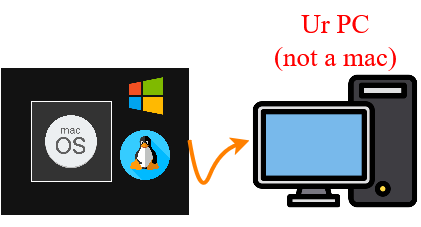
It's also been called "Hackintosh"-ing, but this usually refers to running MacOS directly on non-Mac hardware. Fitting, because you usually need to do some hacking to make it work.
I used VMWare player/workstation to do this for many years to run a Bluebubbles server to get iMessages on my PC. It works pretty well but it's slow and a major pain in the ass to set up for non-intel Hardware. The project OSX-KVM makes using KVM-QEMU, the VM stack for linux, seem like a pretty easy way to stand up a (faster?) MacOS VM on Linux or WSL2. As it turns out, it has headaches of its own. But as you'll see, it does in fact run faster than VMWare Workstation.
KVM-QEMU is linux VM software, not Windows. But I wanted to make it work on Windows 11, so I used OSX-KVM on WSL2, which is kind of insane. The overall schematic looks like this:
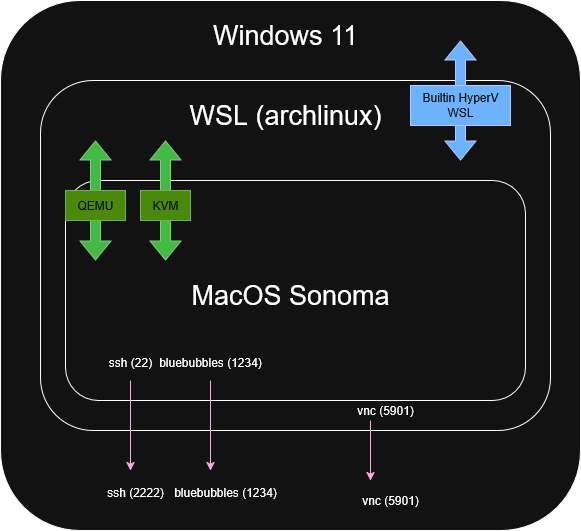
Windows 11 is the main OS. WSL2 runs an archlinux image on Windows through Hyper-V, which can be set up in a few clicks on Windows and generally is passable for using Linux on Windows. You could equivalently use any other Linux image for WSL2. WSL2 runs internal KVM-QEMU virtualization for the guest OS, in this case MacOS Sonoma 14.7.6. The ports from the guest (SSH, BB) are forwarded out of the guest, through WSL2 and into Windows. Last, since X-11 window forwarding is janky on Windows and I didn't want to configure it, I used VNC (and later SPICE) to get graphical output from the WSL2 layer into Windows.
So what we have is a nested virtualization of MacOS running on Windows/WSL2, with outputs for services (Bluebubbles) and interaction from any device on the network (SSH, VNC).
Here's a basic Geekbench comparison between the two, running on the same hardware (Ryzen 5600) and vm parameters (mem 8GB, 2 vCPU core, stored on same SSD) without GPU passthrough. I had previously used a GPU partitioning script to run MacOS on Hyper-V but that didn't work too well, so I'm just running MacOS without graphical acceleration in both VM setups. My usecase mostly as a server does not require a ton of user interaction with the VM so it doesn't matter that much for me. But of course I want the VM to run faster regardless.
Both VMs have the performance enhancements here enabled.
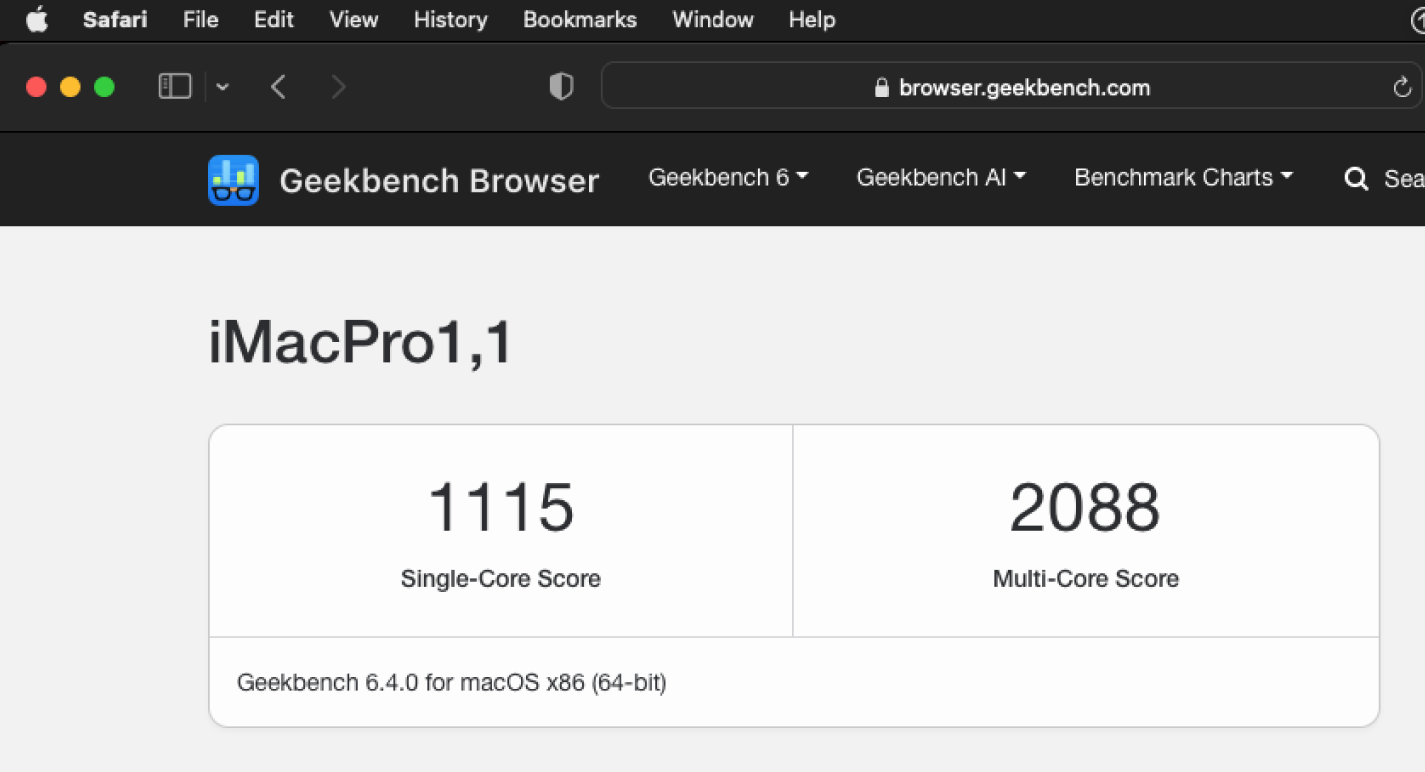
Any-fuckin-ways, these benchmarks should tell you a bit about the virtualized performance of MacOS when running VMWare workstation.
VMWare Workstation Pro 17.6.3 running MacOS Monterey 12.0.1
QEMU 10.0.0-1, KVM in kernel 5.15.167.4-microsoft-standard-WSL2 running MacOS Sonoma 14.7.6
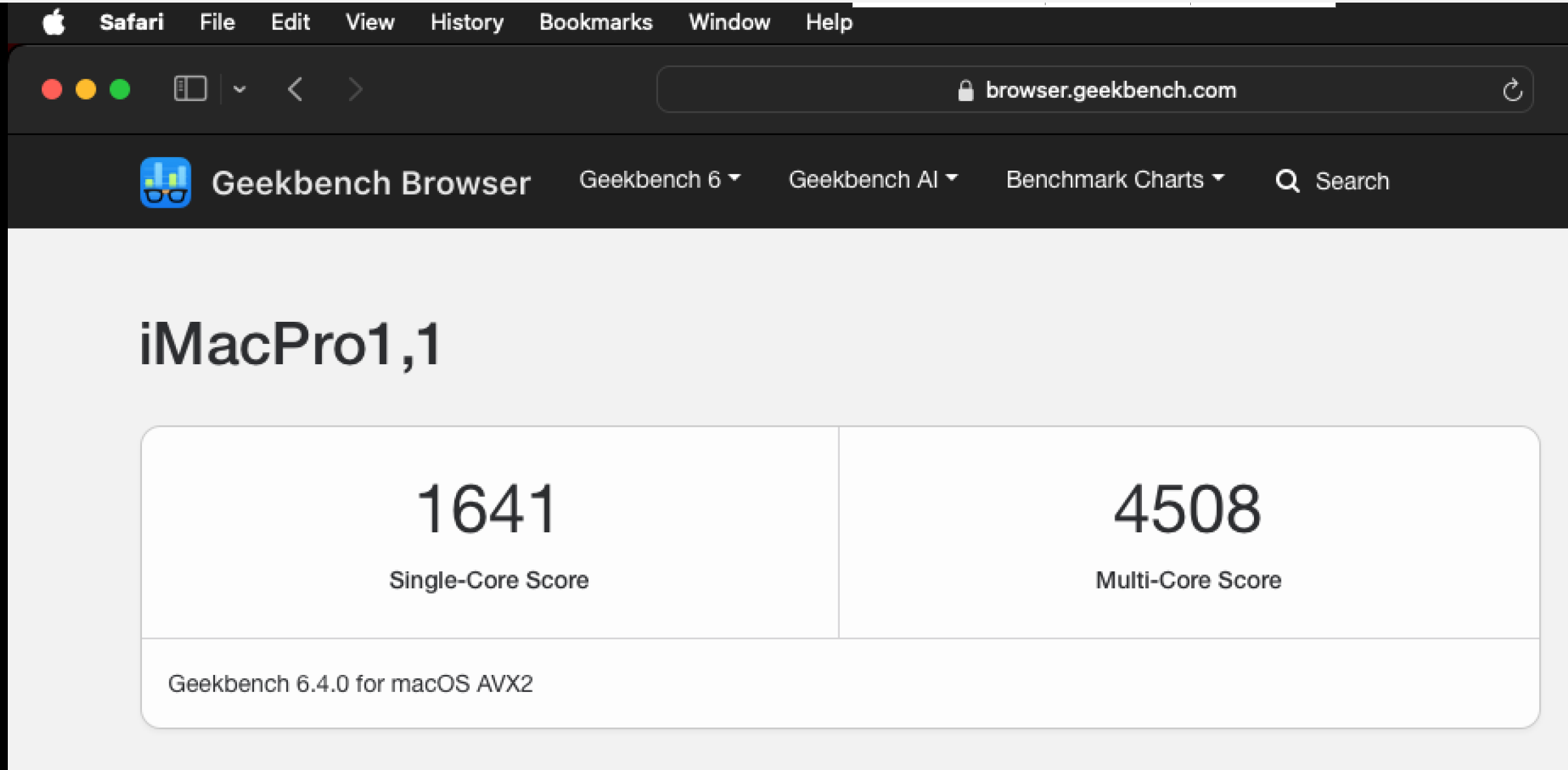
We have more than twice the multicore performance and nearly 50% faster single core with KVM-QEMU/WSL2 over VMWare.
There are some OS/VM differences here that might explain the performance difference. The KVM-QEMU VM is using the host CPU flags which enable it to have instructions (incl. AVX2) passed through directly to the bare metal machine by way of KVM -> HyperV. I couldn't get the similar thing working on VMWare for MacOS, though there may very well be ways to do this.
Also, the VMWare VM is using Monterey, KVM-QEMU is using Sonoma. But this would not explain such a large performance difference between the two normally.
| metric | KVM-QEMU | VMWare |
|---|---|---|
| Host OS | Windows 11 (WSL2, archlinux) | Windows 11 |
| Hypervisor | KVM 5.15.167-QEMU 10.0.0-1 thru WSL2 | VMWare Workstation Pro 17.6.3 |
| Guest OS | Sonoma 14.7.6 | Monterey 12.0.1 |
| Guest CPU | 1 socket, 2vCPU core, AVX2 | 1 socket, 2 vCPU core, no AVX2 |
| Guest Memory | 8GB | 8GB |
| Guest Disk (on host) | 80GB, NVME | 80GB, NVME |
| Geekbench Single Core | 1641 | 1115 |
| Geekbench Multi Core | 4508 | 2088 |
| User interaction | VNC/SPICE | VMWare Workstation Pro GUI |
Here's both running at the same time on my Windows machine.
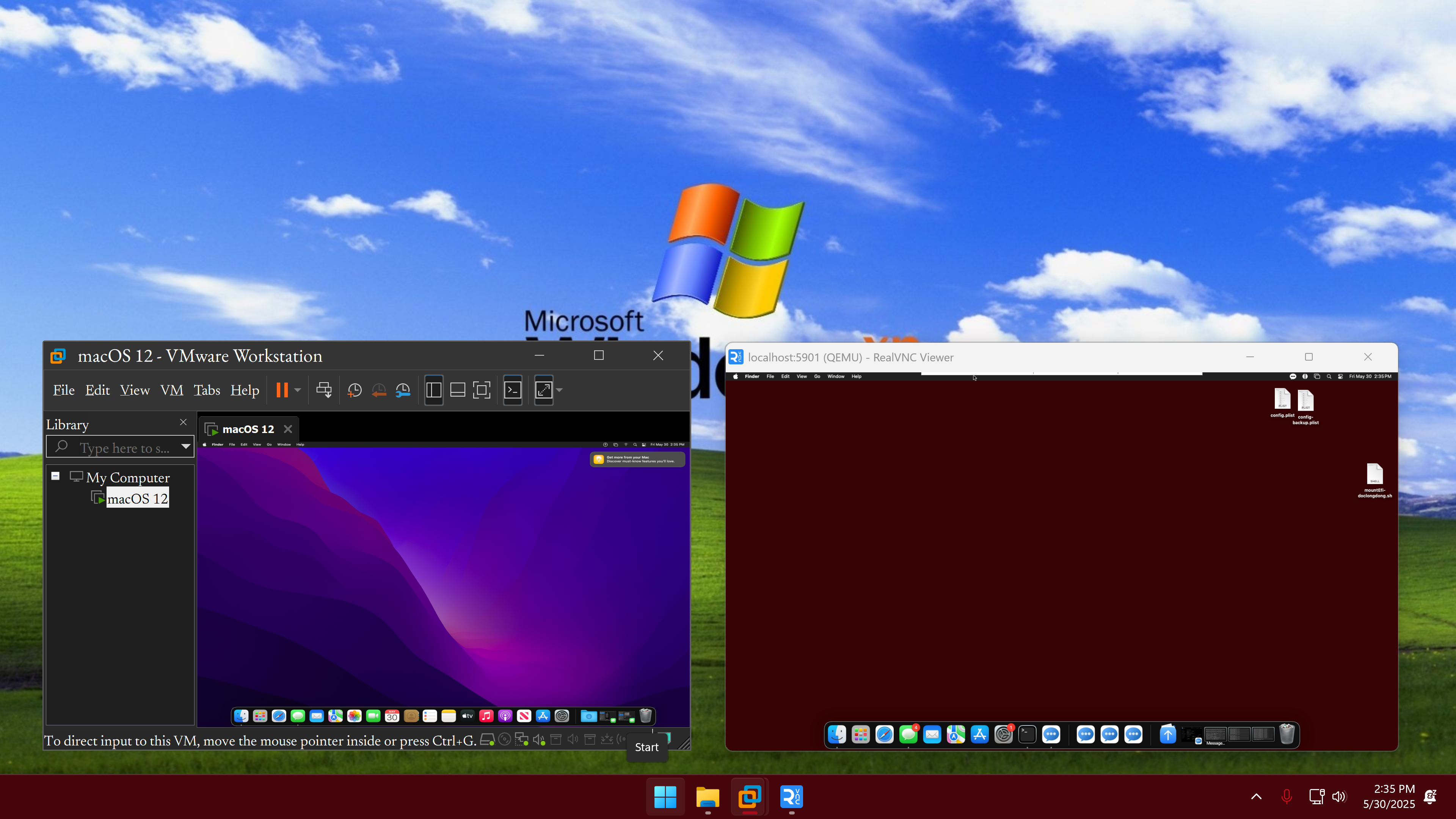
Yes, the above comparison has its problems: different MacOS versions as well as different CPU configurations. So take the above Geekbench scores and these pros/cons with a grain of salt.
Here's the superior VM, as I have them configured, for some common uses:
The OSX-KVM repo makes setting up the basic VM actually quite easy, if you're familiar with the command line. If all the prerequisite packages like libvirt are installed it is easy. Of course, if you're using it in WSL2 like I am, that adds a few config steps like enabling nested virtualization. If you are not familiar with the command line, this will be significantly harder.
Despite being a nice installable program, VMWare gave me trouble even booting the VM because of my AMD CPU, which requires a special instruction set to be added to the vmx file. You also need to use the VMWare unlocker to even run the OS at all, and this only worked for me after some fiddling.
VMWare has a slightly snappier UI than the KVM-QEMU VM, even when using low-latency modern remote-desktop protocols like SPICE instead of VNC. There may be some superior method of interaction, like using X-11 forwarding, but I couldn't get it working through WSL2 for the life of me.
Aside from dragging windows around in the desktop, actually opening programs and using them is significantly faster in KVM-QEMU than in VMWare. Watching a YouTube video on the VMWare VM is impractically slow and glitchy, while the KVM-QEMU one is totally fine.
If you're comfortable with the command line and a bit of man-pages reading, KVM-QEMU is just better for random QoL aspects of running a VM. Resizing the VM window in VMWare adjusts the guest UI size in annoying ways by default unless two specific options (UI scaling, free stretch) are en/dis-abled for the VM. Occasionally, these options revert and the annoyances begin again. If the VMWare guest window gets too large, the already underpowered compute struggles to render the entire desktop and locks up the host for several hundred milliseconds at a time, once every few seconds.
There is also the need to install VMWare tools, use the VMWare unlocker, and generally fiddle around with the VMX file to get everything incl. networking to work. In contrast, using KVM-QEMU is all done by editing one qemu_system_x86 command's arguments, each of which is well documented and works as expected.
Getting either of these to work is a pain in the fucking ass. Essentially, you need to generate an "SMBIOS" for MacOS to obtain the serial numbers needed to vet iServices.
For VMWare, I wasn't able to use a nice software like GenSMBIOS to work directly with the config.plist in the VMWare image itself, so I had to edit the VMX file with a manually configured MAC address/ROM value as shown here. Lots of fiddling.
For KVM-QEMU, I first used GenSMBIOS from within the guest, mounting the EFI partition and pasting in the new values in the config.plist. This allows OpenCore to boot the machine with the required SMBIOS info for iServices to work. However, on second reboot these values revert back to their original, because (as I found out) OpenCore uses a pre-generated boot image created during creation of the OSX-KVM script, and writing the config.plist back to this image does not work persistently for whatever reason.
To fix it, I had to use GenSMBIOS on the host (WSL2), edit the config.plist on the host, and use it as input to a script which regenerates the entire qcow2 OpenCore boot image.
As it turns out, doing this on WSL2 gives you a weird problem because a kernel image is required for the OpenCore/QEMU generation script to run, but WSL2 does not provide an actual kernel image easily accessible from within WSL2. Bizarrely, if you install a compatible kernel to your /boot directory, the script runs. Of course, this kernel image is not used to actually run WSL2, it's just used by QEMU/OpenCore's script to regenerate the virtual hard drive used to boot the guest. Good lord.
If you actually manage to get iServices working on VMWare, they tend to keep working pretty flawlessly.
In KVM-QEMU, I kept having problems with messages not sending due to weird bugs between iMessage, Apple's servers, and the virtual hardware QEMU is presenting to MacOS. Things would be fine for a week, then break, then be fine again, and would generally happen only with single contacts with an associated SMS number. Group chats and contacts with only an iMessage email address were fine.
If you're not comfortable with the command line, probably use VMWare. If you are, probably use KVM-QEMU. If you're insane, use KVM-QEMU on WSL2.
Prompt used to generate this webpage w/ GPT-4o: "STyle this markdown content as red titles, with grey body text, and Georgia font. Images are assumed to be in the same directory as the source file. Add the final section in a dark yellow box."